RESOLVED: Problem with “Sign in for Request Options”

When following a “Find It” or “Full Text” link from an external database (like one from EBSCO or from Google Scholar), you will be taken to a Catalyst record for the article. The link to follow to correctly resolve to full text is the link that will mention the name of the database, like this one:
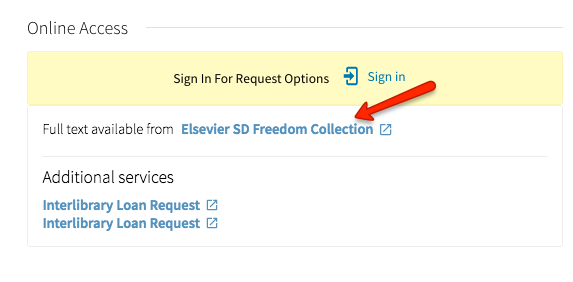
full-text-link

If you click on the “Sign In” link in the yellow box that says “Sign in for Request Options,” you are redirected to the wrong page (it will look like a web page from the 1990s with old styling).

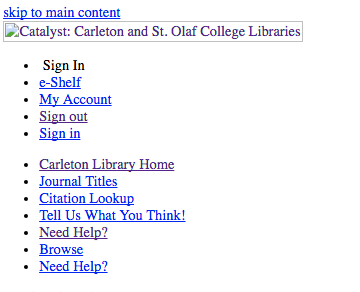
online-access

no-css

This is a known issue and we are working hard to fix it, but in the meantime, simply follow the “Full text available from _____” link to get to the full text of the article.
Zotero Bookmarklet Not Working with Catalyst

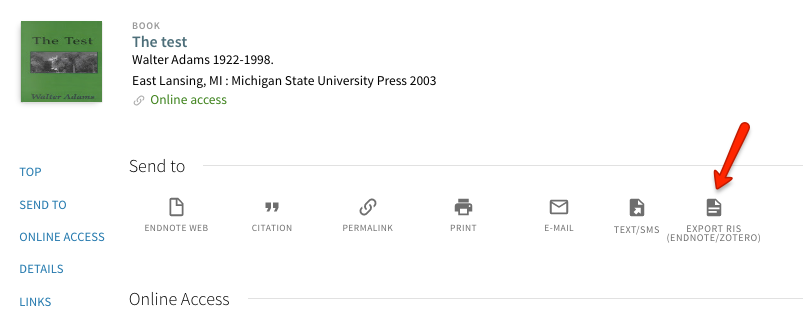
We are aware that the Zotero bookmarklet is not properly saving records with complete metadata from Catalyst into Zotero libraries. Instead, the records come in blank and labeled as Catalyst. Until we are able to fix this issue, the workaround is to use the “Export RIS (Zotero/EndNote)” button for the record, and either open the record directly into Zotero (or another bibliographic app like EndNote or Mendeley) or save the record and then import it into the program while you have it open. One of the librarians can show you how to do this.

ris


Workarounds:

  • You may manually input records into Zotero.
  • Use Worldcat to input the metadata from their site using the Zotero bookmarklet.

Filter Scroll Not Working Properly in Chrome

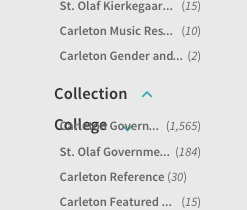
We have many reports that the filters (the categories on the left-hand side of the screen that let you narrow your search) are not scrolling properly. As you scroll down through them, the filters start to overlap and are impossible to read. This is a known issue for Chrome and possibly Safari, but is not reported for Firefox. We have reported this problem to the software provider behind Catalyst (ExLibris). In the meantime, we recommend using Firefox to avoid this issue.

frames